People, AI agents and integrations on one state machine
How to let AI agents, automated integrations and people each move cases through a quote and bind process, with the state machine deciding what each is allowed to do and recording who did what.

AI agents can now read documents, check details against each other, chase customers for missing information and explain a price. For an insurer or lender, the practical question is how to let an agent do that work while keeping control of what happens to each case.
A state machine is a practical answer. It defines what state each case is in, which moves are allowed and who is allowed to make them. People, AI agents and ordinary integrations then all work on the same cases, through the same rules, and every move they make is recorded against their name.
Three kinds of worker
Most quote and bind processes already have two kinds of worker: people and integrations. AI agents add a third.
| Worker | Good at | Example |
|---|---|---|
| Integration | Fast, repeatable steps with clear inputs | Posting an application from a portal, calling a KYC provider |
| AI agent | Reading unstructured material, matching it to the rules, explaining results | Reading an uploaded document and checking it against the form |
| Person | Judgement, exceptions and decisions with consequences | Clearing a referral, re-pricing a case, accepting a sale |
The mistake is to give any one of them the whole process. Integrations cannot handle a blurry photo of a document. AI agents should not decide on their own to accept a case a rule has referred. People should not spend their day retyping data that a machine can read.
Assigning work by stage
The six-module flow from our introduction to state machines makes it easy to say who does what. Each module has its own tasks, and each task can go to whichever worker suits it.
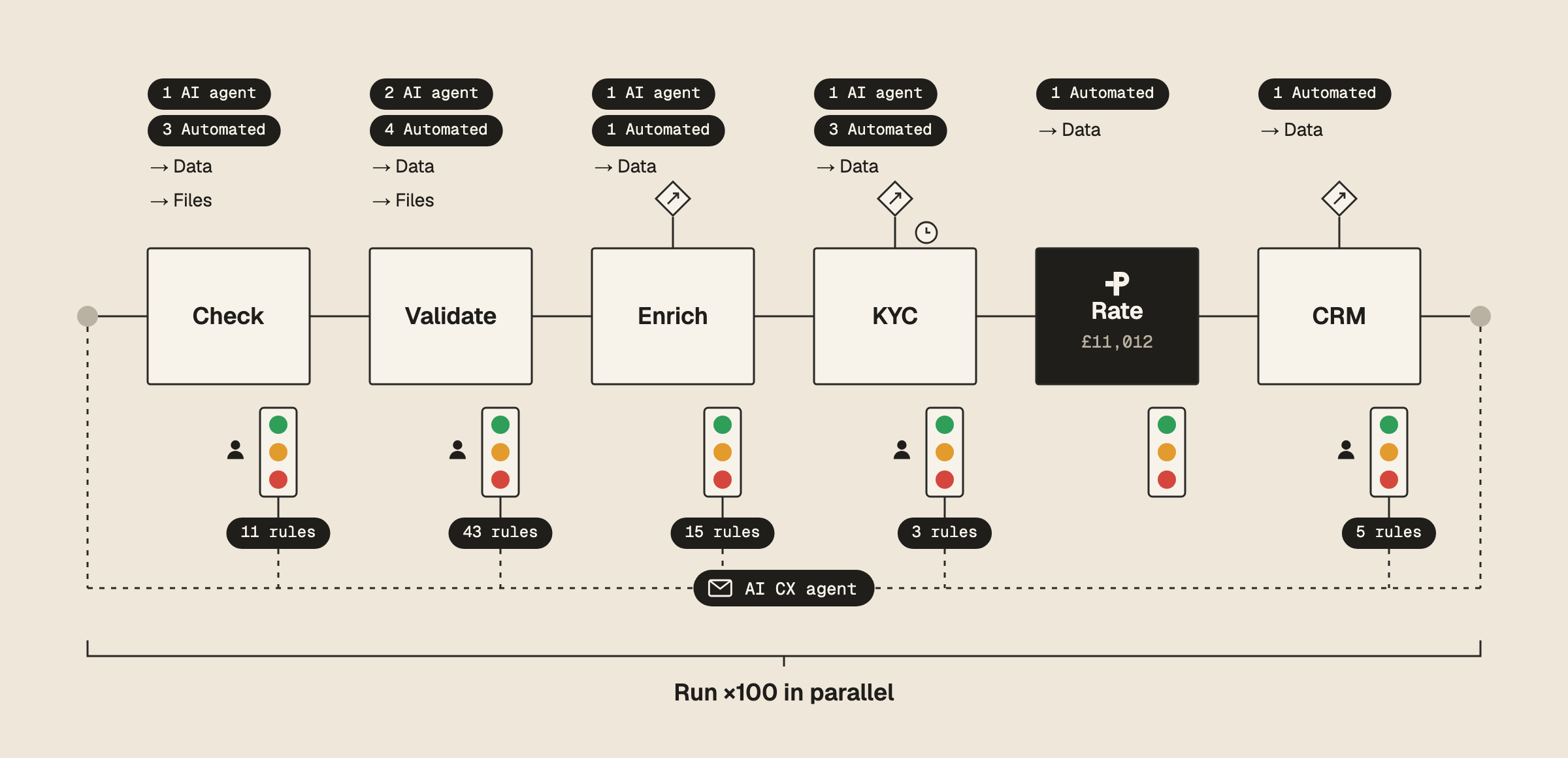
Reading the diagram:
- Above each module are the workers that do its tasks. Validate has two AI agent tasks, such as reading documents and matching them to the form, and four automated ones.
- Below each module is its traffic light and the number of rules that set it. Validate has the most rules, because that is where most of the checking happens.
- A person sits next to a light where an amber or red result needs one. Rate has no person: if the earlier modules are green, pricing runs by itself.
- The AI customer agent along the bottom reacts to the lights. When a module turns red for a missing document, it asks the customer for that document. It does not decide whether the case passes.
- Cases run side by side. Because each case is in its own state, a hundred can move through at once. None waits for another.
AI agents propose, the state machine decides
The most important design choice is that an AI agent never moves a case directly. It submits information, and the model decides what that information means.
When the validate agent reads an uploaded document, it sends the values it found. The Validate module's rules then decide whether the case is green, amber or red. If the agent misreads something, a cross-check between documents can catch it and refer the case. The agent cannot skip a rule, turn a red light green or mark a case as sold, because those moves are not open to it.
This gives you a clear set of permissions to decide on:
- Read. Can the agent see projects, quotes and journeys?
- Run. Can it run a quote to try something out, without saving?
- Save. Can it save a quote that moves a journey forward?
- Amend. Can it change a saved result, its validity or whether it is sold?
- Edit. Can it change the rules themselves, in a draft?
For most firms, agents doing operational work should read, run and save. Amending results and accepting sales should stay with named people. Editing rules belongs to a separate change process with tests and approval, covered in our article on system models.
One journey, five workers
Here is one case from start to sale. Each row is a saved quote: a snapshot of the case at that moment, made by a different worker.
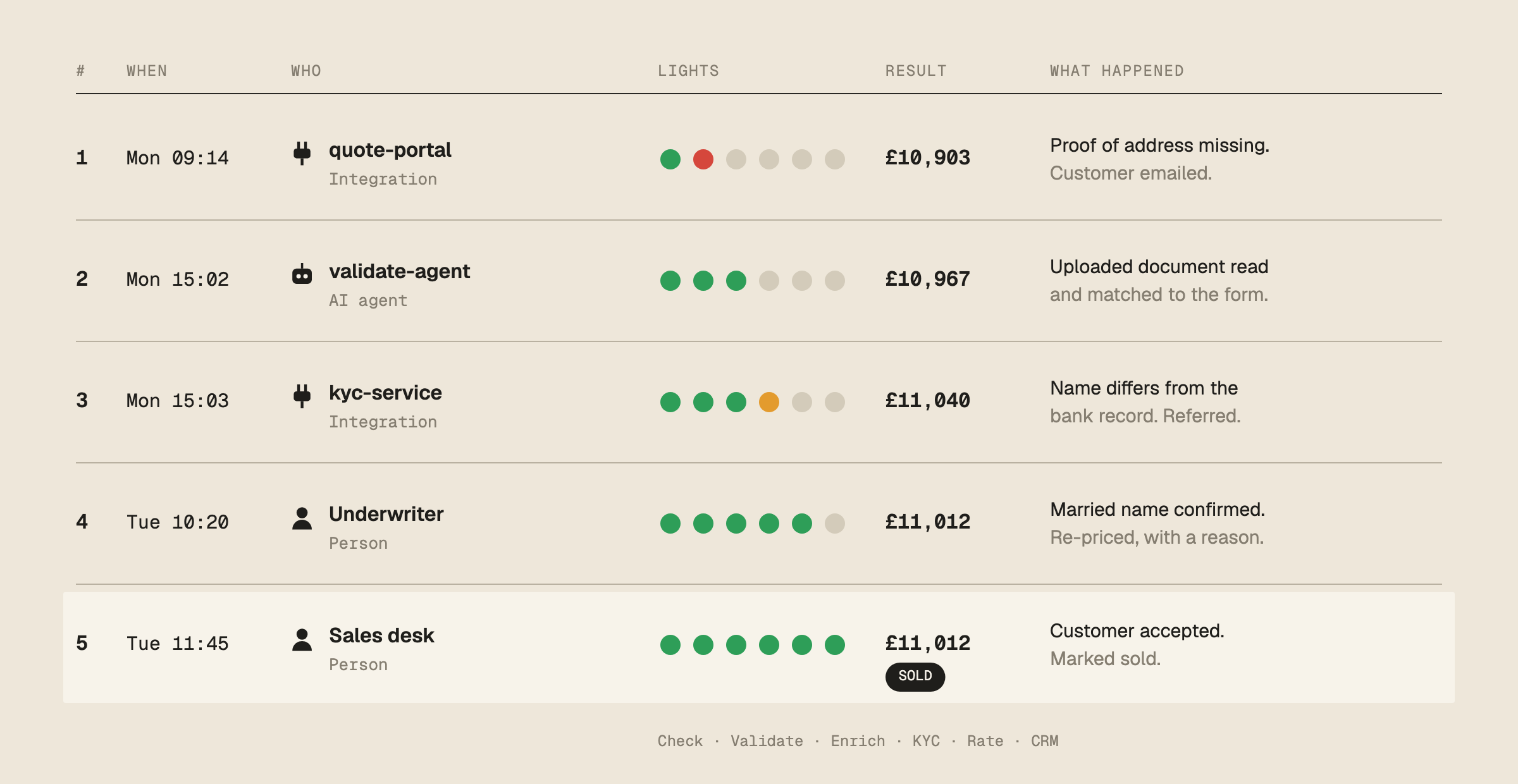
- The portal integration posts the application. Check passes, Validate stops because proof of address is missing, and the customer is asked for it.
- The customer uploads the document. The validate agent reads it, matches it to the form and posts an updated quote. Validate and Enrich turn green.
- The KYC integration finds that the name differs from the bank record. That rule refers, so KYC turns amber. The case keeps its place.
- An underwriter sees the referral with the evidence, confirms the applicant's married name, and re-prices the case with a note explaining why.
- The sales desk confirms the customer has accepted and marks the quote sold. The journey is complete.
The underwriter touched this case once, for the decision that needed judgement. Everything else moved without waiting for a person.
Moving the dial
When a new process goes live, most firms want a person to check every case. As confidence grows, checks can move to a sample, and then to exceptions only. With a state machine this is a change to rules, not a rebuild.
- Start with a rule that refers every case, so every quote turns amber at the relevant module.
- Narrow it to refer only certain channels, case sizes or conditions.
- Keep a sample of green cases going to review if your controls need it.
Because every quote records which rules fired and who acted, you can show the evidence for each step: how many referrals there were, how many a person changed, and how long cases waited.
How this is done in Ptally
Ptally is the rating and rules state machine for quote to bind. A basic rating engine can give an AI agent a price, but it cannot tell the agent which moves are allowed or record what the agent did. Ptally does both.
- Everyone uses the same model. Integrations call the API. AI agents and assistants such as Claude and ChatGPT connect to the MCP server. People use the dashboard. All of them run the same version of the same model.
- Every quote records who made it. Each saved quote shows whether a person, an AI agent or an integration ran it, so a journey reads as a log of who did what.
- Permissions are enforced by the platform. Agent and service accounts can read projects, run quotes and save them to a journey. They cannot amend saved quotes or edit model versions. People with the right role can amend a result, its validity or the sold flag, and every amendment is logged with who, when and why. The engine's original result is always kept.
- Agents only change drafts. If you let an assistant help with the rules, it works on a draft version through MCP. Approving and publishing stay with people. Our article on AI approval workflows covers this in detail.
- Answers come from the record. An assistant connected over MCP can walk through a journey, list the referred cases or explain which rule stopped a case, using the saved quotes rather than guessing.
Getting started
If you want AI agents to take on real work in your quote or application process, start by mapping each stage and deciding who, or what, should do it. There is no implementation fee and nothing to pay upfront. Talk to our team.