What is a state machine? A plain-English guide for insurance and finance teams
A state machine keeps every case in one named state, moves it only when an event and a rule allow, and records every move. Here is how that works for quoting, binding, lending and claims, with diagrams.

Ask an operations team where a case is, and the answer is often a person's name. "It's with the underwriting team." "Sarah is waiting on a document." "I think it went back to the broker." Each answer is true, but none of them is a state the business has defined, and none of them tells you what happens next.
A state machine is a simple way of fixing that. It is one of the oldest ideas in computing, and it is a good fit for any business where a case moves through checks before money changes hands: insurance quotes, loan applications, account openings, claims and payments.
This guide explains the idea without code, using one quote-to-bind process as the running example.
Four ideas
A state machine needs only four things.
- States. A short list of named situations a case can be in, such as Received, Validated, Priced, Quoted and Sold. A case is always in exactly one of them.
- Events. Things that happen to a case: a document arrives, a check passes, a customer accepts.
- Rules. Conditions that decide whether an event is allowed to move the case, and to which state. A quote cannot move to Sold unless it has been priced. A case with a missing document cannot be priced.
- Records. Every move is saved, with the event that caused it, the rule that allowed it and who or what triggered it.
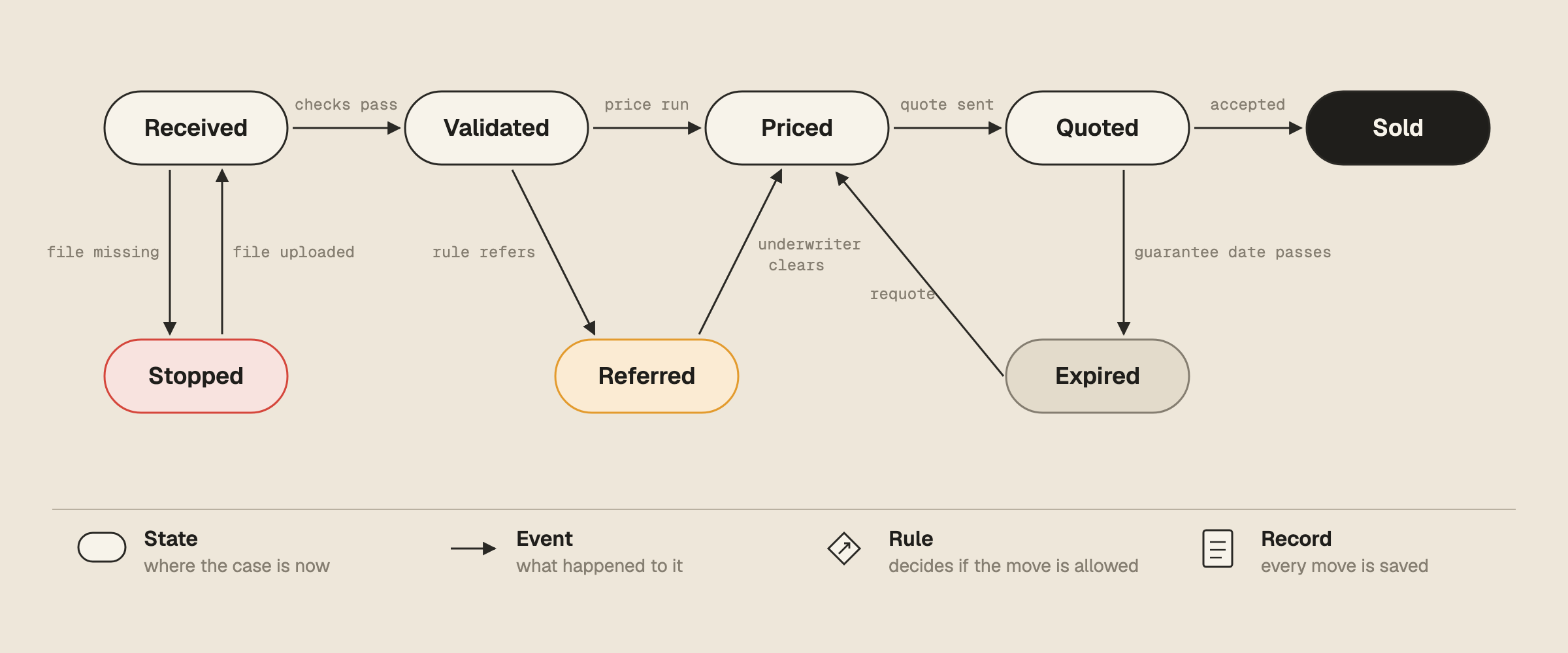
The diagram shows a typical quote. Most cases go straight along the top row. Some take a detour: a missing file stops the case until it is uploaded, a rule refers it to an underwriter, or the quote's guarantee date passes and it needs a requote. Every detour is a state with a name, and every route back is a defined event. Nothing is "somewhere in the process".
Why "only one state at a time" matters
The rule that a case is always in exactly one state sounds obvious. It is also the part most manual processes break.
When a case lives in an inbox, a spreadsheet and a policy system at the same time, each can tell a different story. The spreadsheet says priced, the inbox says waiting on a document, the system says quoted. Someone has to work out which is true, and in a regulated business someone may later have to prove it.
A state machine removes the question. There is one record of where the case is, and the only way to change it is through an event that a rule allows.
Breaking a process into modules
Real processes have more than five states, so it helps to group the work into modules, each with a clear job. A common shape for quoting and binding has six:
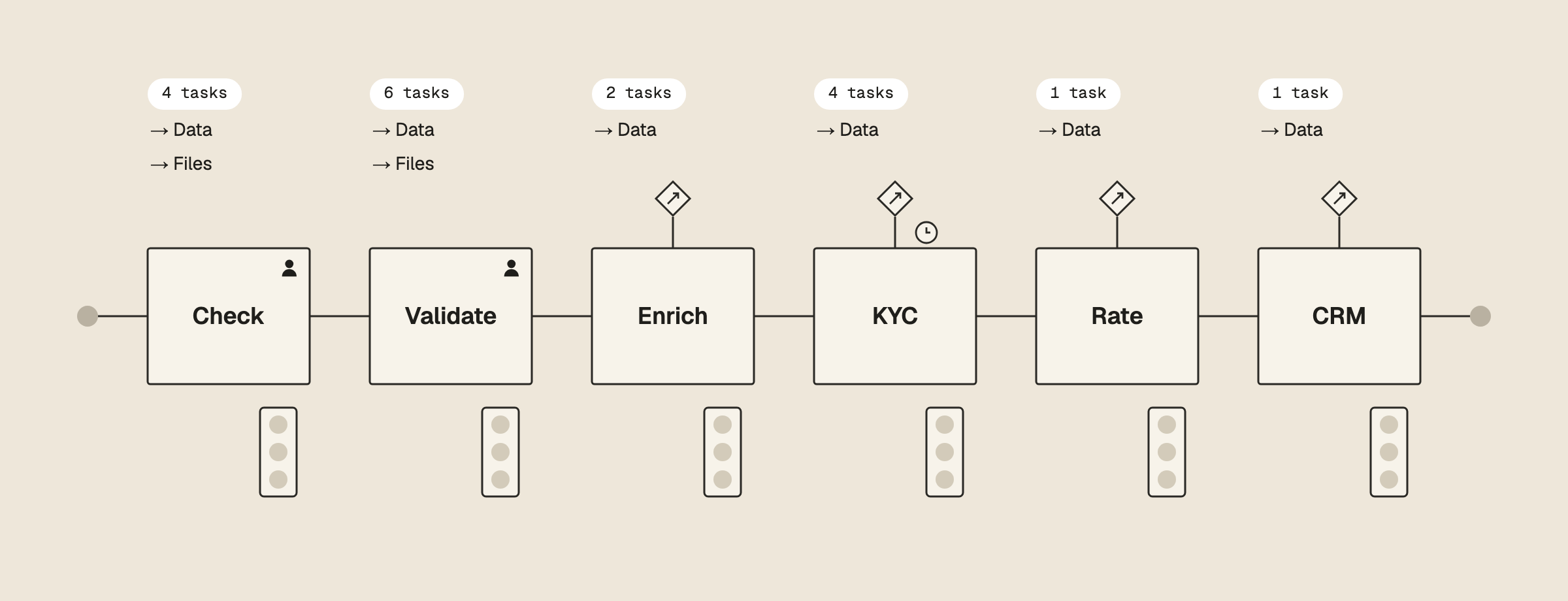
- Check. Is the case complete enough to start? Are the required fields and files present?
- Validate. Do the details agree with each other and with the documents? Are they within the rules for the product?
- Enrich. Add data from outside sources, such as address, property or vehicle data.
- KYC. Identity, sanctions and fraud checks, often with an outside provider and sometimes a wait.
- Rate. Price the case.
- CRM. Record the outcome and hand it to the systems and people who act on it.
The same six modules fit a motor policy, a small business package, a personal loan or a retirement income product. The rules inside each module change; the shape does not.
Traffic lights: what each module decides
Each module ends by setting a light. This is the simplest way to show a state that a person can read at a glance.
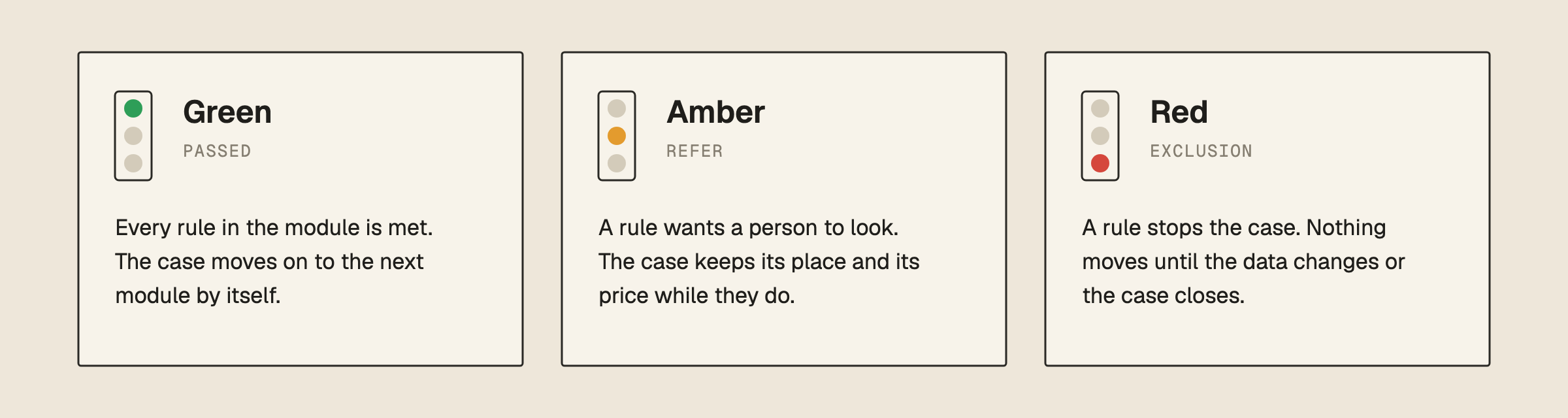
Whether a rule turns a module amber or red is a business decision. An amber light says "carry on, but a person should look at this". A red light says "stop". Moving a rule from amber to red, or back, changes how many cases wait and how many get through, so it deserves the same care as a rate change.
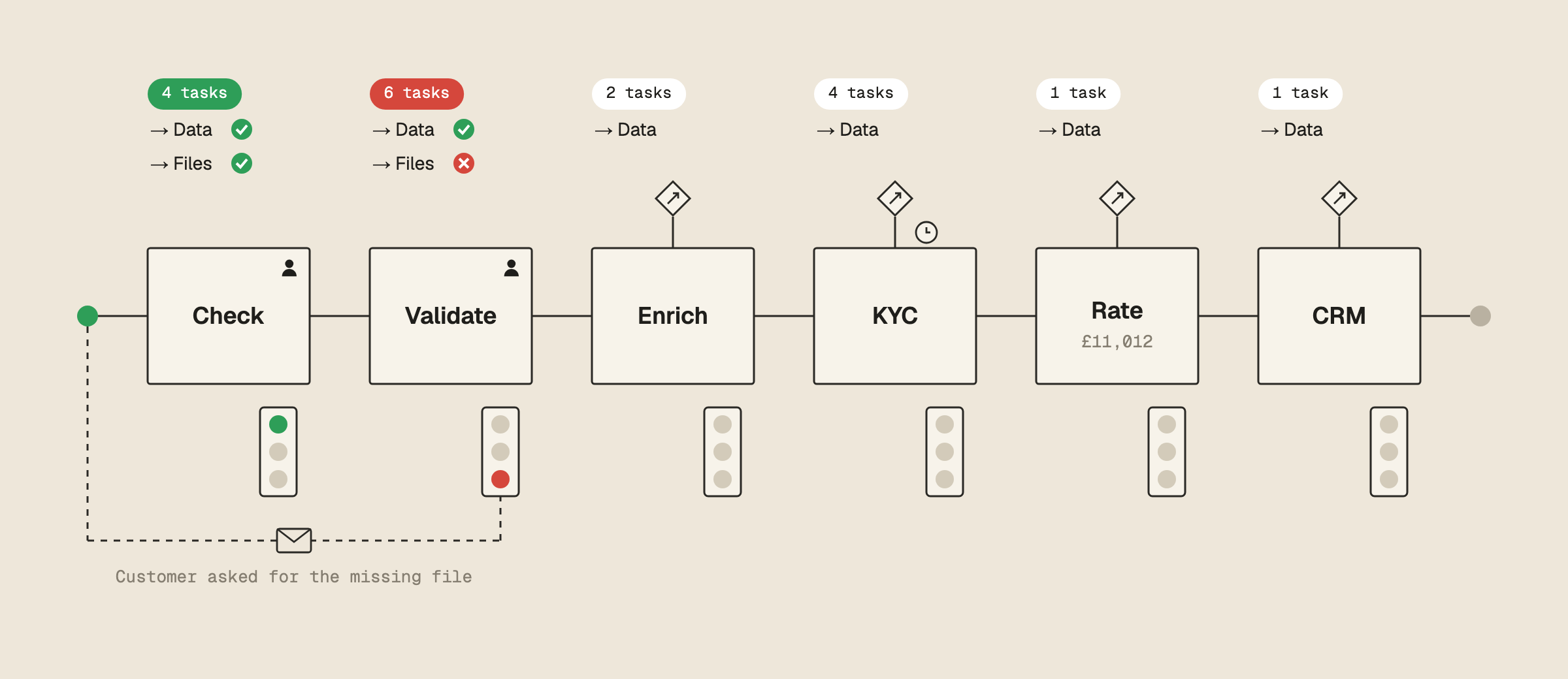
Lights also make the next action obvious. Here a case has passed Check but stopped at Validate because a file is missing. The state machine knows exactly what is wrong, so the customer can be asked for that one file automatically, and the case picks up where it left off when it arrives.
Watching a case change state
Because every move is recorded, you can replay a case. Each saved snapshot shows the lights at that moment and the price the model produced from the information it had.
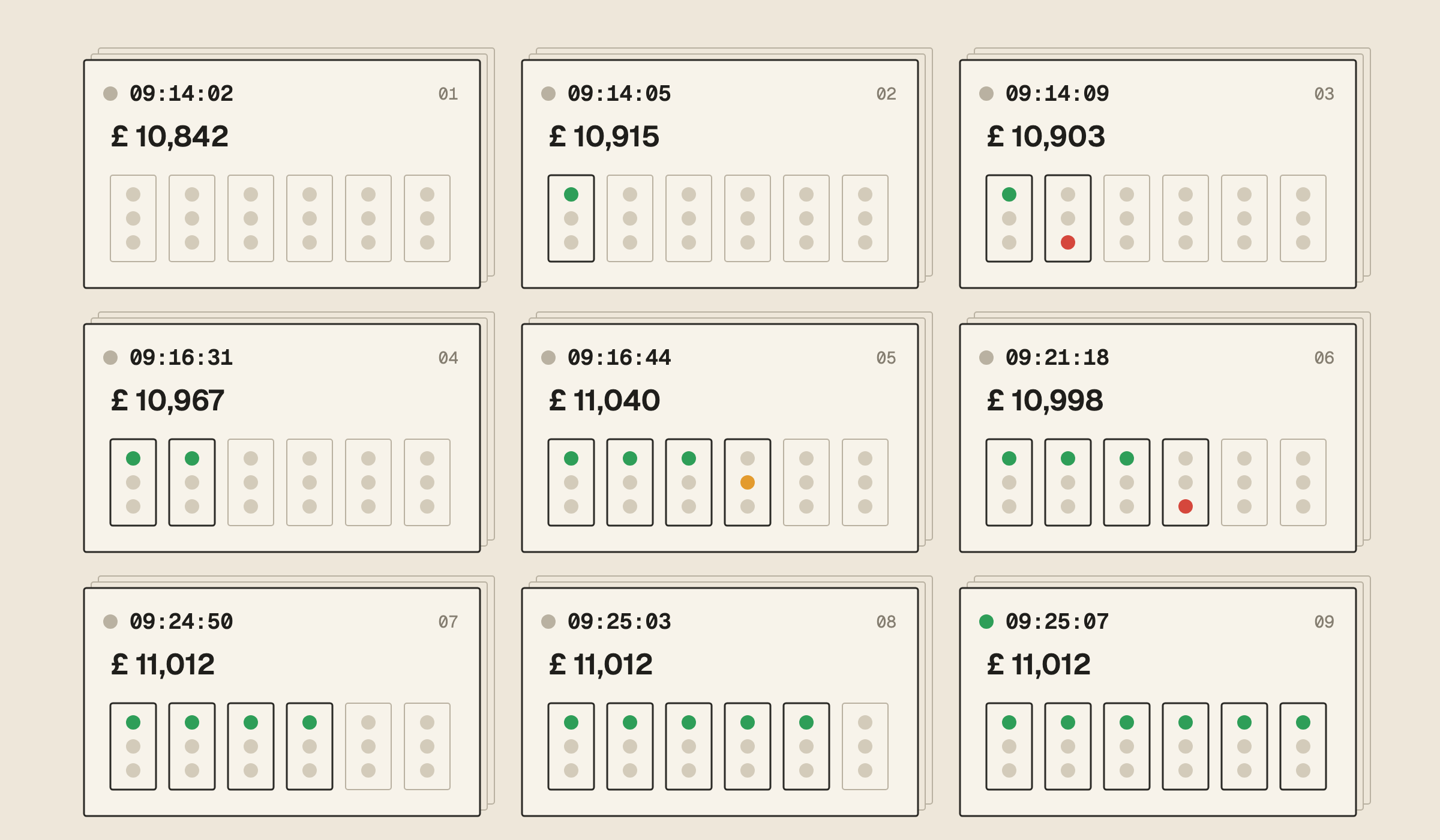
Reading left to right and top to bottom: the case arrives with no lights, Check passes, Validate stops on a missing file, the file arrives and Validate passes, KYC refers and then stops, the issue is resolved, and the last two modules pass. The price moves as information is added and corrected, and every intermediate price is kept.
This is what an audit trail looks like when it is built in rather than reconstructed. The same record answers three different questions: where is this case now, how did it get here, and how long did it spend at each stage.
The same idea outside insurance
State machines are everywhere in financial services, often without the name.
| Process | Typical states | Example rule |
|---|---|---|
| Card payment | Authorised, captured, settled, refunded | A payment cannot be refunded before it is captured |
| Loan application | Submitted, affordability checked, approved, offered, drawn down | An offer cannot be made before affordability passes |
| Account opening | Started, identity verified, screened, open, restricted | An account cannot open while screening is unresolved |
| Insurance claim | Notified, validated, reserved, settled, closed | A claim cannot be settled above its reserve without approval |
In each case the value is the same: a short list of allowed states, clear rules for moving between them, and a record of every move.
How this is done in Ptally
Ptally is a rating and rules state machine for quote to bind. A basic rating engine returns a price; Ptally runs every stage around it as well. You describe the modules, their rules and the order they run in, and Ptally runs it, records it and serves it.
- Modules are models. Each module (Check, Validate, Enrich, KYC, Rate, CRM) is its own Ptally project with its own versions and tests. A system model runs them in order as steps.
- Rules set the lights. Refer rules turn a module amber and exclusion rules turn it red. A quote with an exclusion is not valid. Each module returns its light as an output, so every quote shows where it stopped and why. See how rules are written in the developer guide.
- Every run is a snapshot. Each quote is saved with its inputs, outputs, lights, rules that fired and the version that ran it. Quotes saved with the same journey reference form a journey, and the journey ends when a quote is marked sold.
- Anything can read the state. The API and MCP server return the same record, so a portal, an internal dashboard or an AI assistant all see the same state.
- Every quote can be explained. A debug trace shows each step, each rule that fired and how the result was reached.
The follow-on articles cover replacing schemas and service contracts with one system model, running people, AI agents and integrations on the same state machine, and why finance and insurance rely on state machines.
Getting started
If your quote or application process lives across inboxes, spreadsheets and several systems, you can model it as a state machine on Ptally with your AI client, starting from the process you have today. There is no implementation fee and nothing to pay upfront. Talk to our team.